 Antiqly for Chrome
Identify antiques on any web page
Right-click a photo on eBay, Etsy, an auction site or any page and choose Identify with Antiqly. A side panel shows what the item is, when and where it was likely made, its materials and maker's marks, an estimated secondhand value range and what to check next.
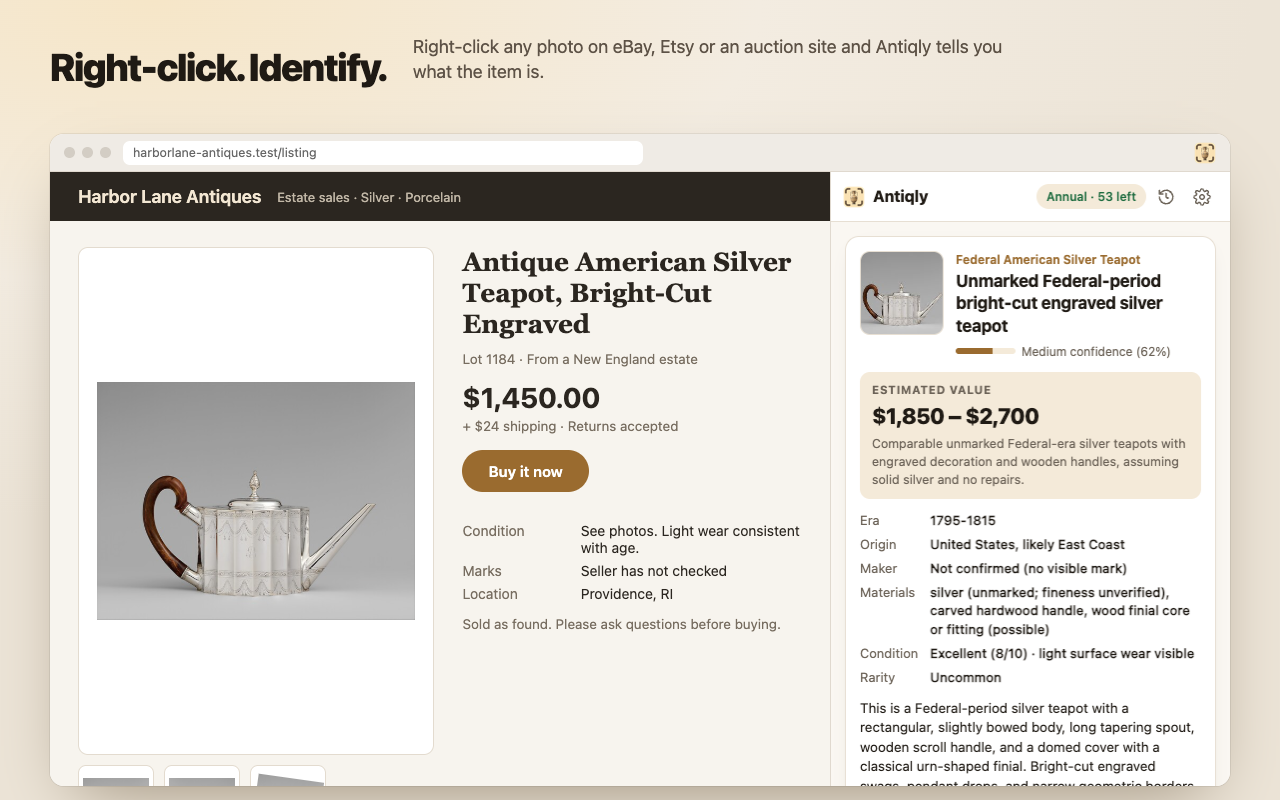
How it works
- Right-click a photo of an item and choose “Identify with Antiqly”. Or press Alt+Shift+A and click any image on the page.
- Antiqly reads the image and our AI identifies it in about 10–20 seconds.
- The result stays in your history (last 20, saved only in your browser).
Results are AI estimates from one photo, not an appraisal or a statement of authenticity. Check marks, condition and authenticity in person or with a specialist before you buy or sell.
Plans
- Weekly: $7.99 per week, 50 identifications per week.
- Annual: $39.99 per year, 60 identifications per month.
Identification requires a plan. Subscriptions renew automatically until you cancel; cancel anytime from “Manage subscription” in the extension. Payments are handled by Stripe. See the Terms of Use.
Privacy
Antiqly only looks at a page when you ask it to: the image you pick (and that image's alt text and the page title) is sent to our server and our AI provider to identify it. It does not read your browsing history or other pages. Read the Privacy Policy.
On your phone too
Antique Identifier - Antiqly is also available for iPhone and Android, with its own subscription.